The Short Version
4.3 / 5 — Tuta does the two things that matter most for a Gmail alternative: it doesn't scan or profile your mail for ads, and it encrypts more of your data by default than most competitors, including your calendar and contacts, not just message bodies. The trade-off is a smaller feature ecosystem than Gmail and no PGP interoperability. What's new is that switching over is finally low-effort too, thanks to a One-Click Migration tool currently in closed beta.
Best for: anyone who wants out of Gmail's ad-supported model and is comfortable trading some ecosystem convenience for a provider that's structurally unable to read your mail.
Gmail's business model runs on knowing as much about you as possible, and even with ad personalization dialed back over the years, Google's systems still process your inbox to power search, Smart Compose, spam filtering, and increasingly, Gemini's AI features. Tuta was built from the ground up to make that kind of processing structurally impossible: emails, calendar entries, and contacts are end-to-end encrypted, and Tuta says it has no technical ability to read them even if compelled to, because it never holds the decryption keys.
What Actually Makes Tuta Different From Gmail
The headline feature is encryption scope. Most encrypted email providers protect the message body and leave metadata like subject lines exposed. Tuta encrypts subject lines by default too, along with your calendar entries and address book Google Calendar and Google Contacts data aren't end-to-end encrypted at all under Gmail. Tuta's apps are fully open source, not just the server-side code, so the encryption claims are independently checkable rather than something you have to take on faith.
Making the Switch: One-Click Migration
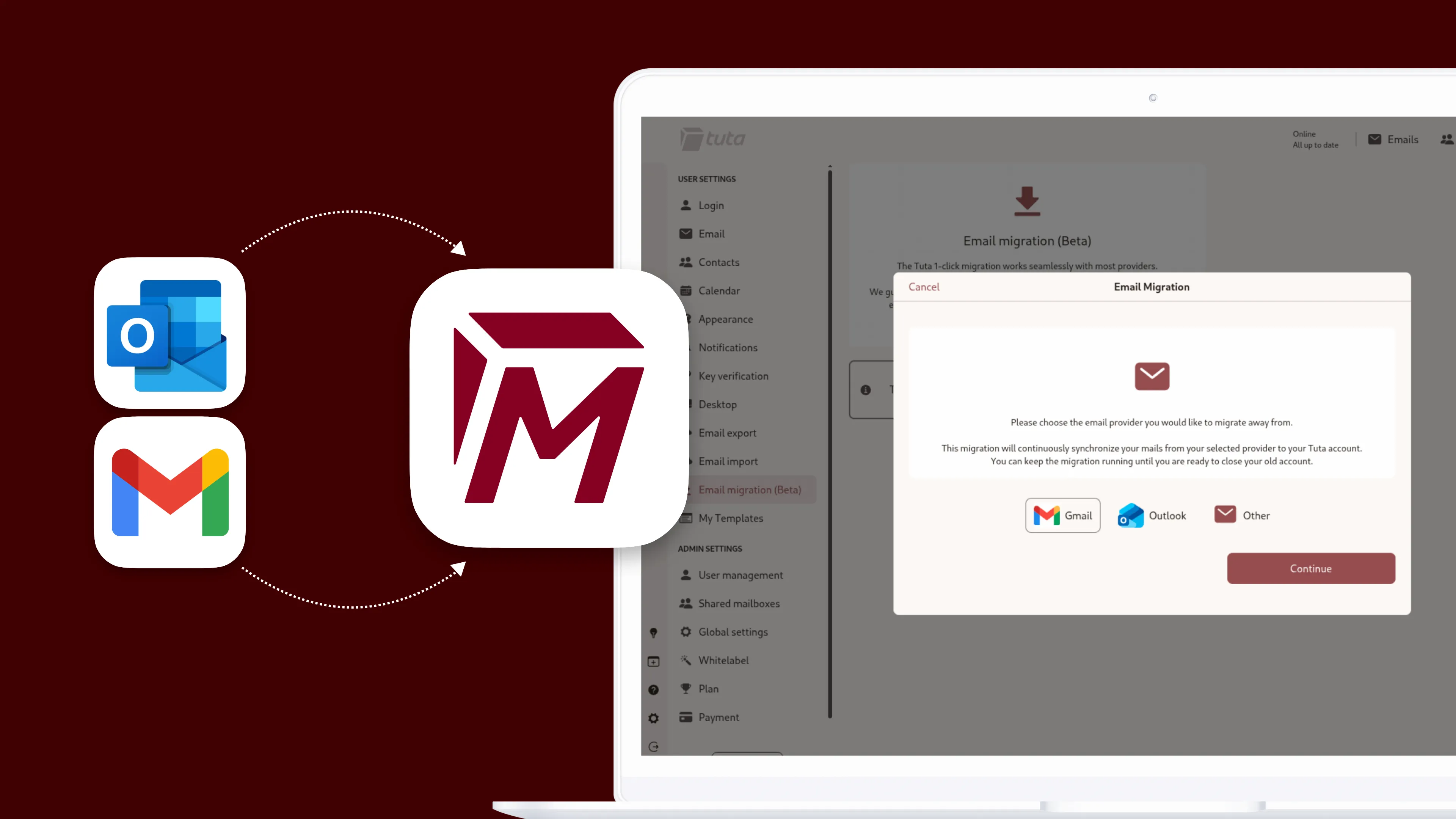
The biggest practical reason people put off leaving Gmail is the move itself nobody wants to manually export and re-upload years of mail. Tuta's answer, announced in a July 2026 update and currently in closed beta, is One-Click Migration: link an old Gmail or Outlook mailbox, and Tuta automatically imports your mail while preserving your folder structure, then keeps a one-way sync running so new mail keeps landing in Tuta too, until you're ready to close the old account. Data is encrypted on your device before it reaches Tuta, matching the zero-access model used everywhere else in the product. It's not available to everyone yet Tuta is testing it with a limited set of accounts before a wider rollout to paid and business plans.
Where Tuta Is Honest About Its Limits
Tuta doesn't support PGP, so you can't exchange encrypted mail with someone using a PGP-based provider encryption only applies automatically between Tuta users, or via a shared password for outside recipients. It also doesn't offer standard IMAP/SMTP access, which means you're using Tuta's own apps rather than plugging it into a third-party mail client like Apple Mail or Thunderbird. And Tuta's user base, while sizable, is a fraction of Gmail's, so the plugin and integration ecosystem is much smaller.
Pricing
| Plan | Price | What you get |
|---|---|---|
| Free | $0 | 1 GB storage, 1 calendar, 3 labels, fully encrypted |
| Revolutionary | €3 / month (billed yearly) | 20 GB storage, unlimited calendars and labels, 15 aliases, 3 custom domains |
| Legend | €8 / month (billed yearly) | 500 GB storage, unlimited calendars and labels, 30 aliases, 10 custom domains |
Both paid tiers undercut Proton Mail's equivalent plans on price for comparable storage. One-Click Migration will roll out to existing paid and business plans once the closed beta wraps up; Tuta hasn't said whether it'll extend to the free tier.
What's good
- No ads, no scanning, no profiling of your mail
- Encrypts subject lines, calendar, and contacts too
- Fully open-source apps, not just the backend
- Cheaper paid tiers than most encrypted competitors
- German jurisdiction: no gag orders, no backdoor mandate
- New One-Click Migration removes the switching friction
Where it falls short
- No PGP support for interoperating with other providers
- No IMAP/SMTP locked into Tuta's own apps
- Smaller plugin and integration ecosystem than Gmail
- Can be legally compelled to monitor plaintext/metadata on a specific account under a valid German court order
- One-Click Migration still in closed beta, limited access
Frequently Asked Questions
Can Tuta read my emails?
Tuta says no end-to-end encryption means it never holds the decryption keys for your mail, calendar, or contacts, so it has no technical ability to read them, including in response to a legal request for content.
Is Tuta actually free to use?
Yes. The free plan includes 1 GB of storage, one calendar, and full encryption, with no ads. Paid plans add storage, aliases, custom domains, and unlimited calendars and labels.
How hard is it to move my old Gmail account over?
With One-Click Migration, once you have access to the closed beta, it's largely automatic you link your old account and Tuta imports and syncs it while preserving your folder structure. Outside the beta, Tuta still supports manual EML/MBOX import.
Can I use Tuta with Outlook, Apple Mail, or Thunderbird?
No. Tuta doesn't offer IMAP/SMTP access, so you're limited to Tuta's own web, desktop, and mobile apps rather than a third-party mail client.
Sources
- Tuta's official One-Click Migration announcement
- Tuta's official pricing page
- Tuta's explanation of German data-protection law
- Tuta's open-source repository on GitHub
This review was written by DigitalEscapeTools based on Tuta's official announcements, pricing pages, and published third-party reporting at the time of publication. It contains no affiliate links.